Pad foundations supporting two columns - Combined Foundations
This tutorial demonstrates how to analyse and design a reinforced concrete combined footing supporting two columns using the MasterSeries Finite Element Analysis (FEA) module. The workflow covers modelling, soil spring definition, analysis, and reinforced concrete slab design.
Example
For this example, the combined footing has the following properties:
| Item | Value |
|---|---|
| Column P1 pedestal | 300 × 300 mm |
| Column P2 pedestal | 400 × 400 mm |
| Pedestal height | As required above the footing |
| Column spacing | 3.0 m |
| Allowable bearing pressure | 300 kN/m² |
For this example the assumptions are:
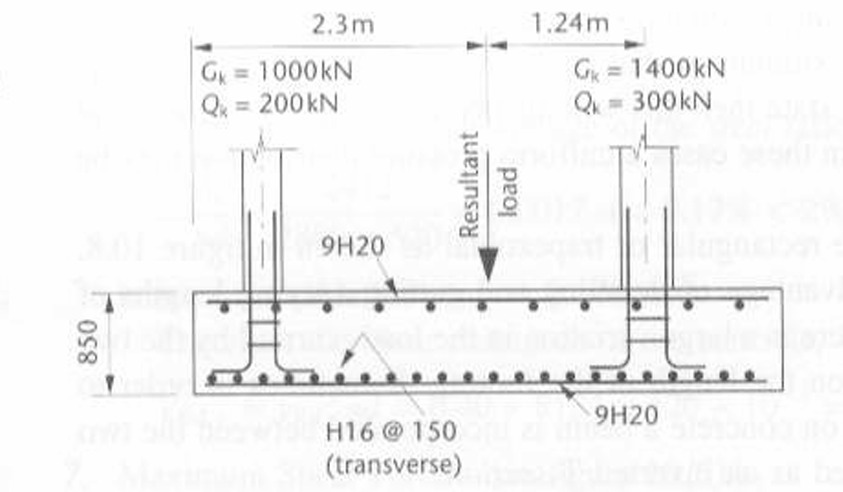
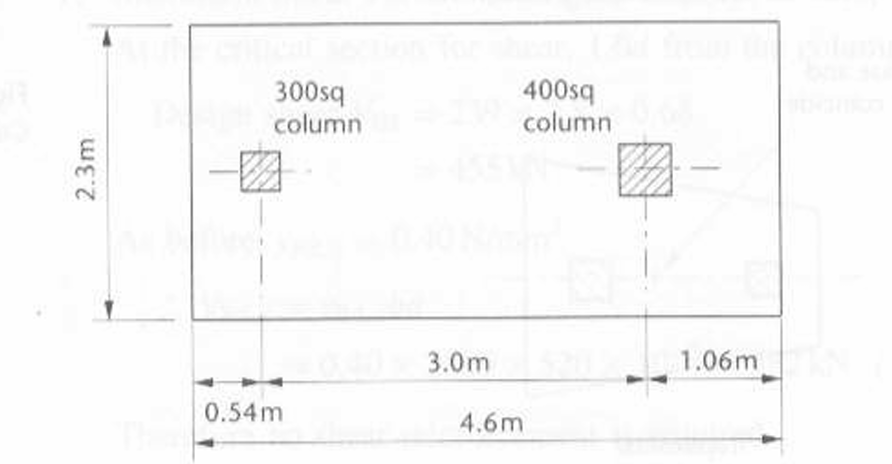
Concrete Pedestals P1 300x300 mm and P2 400x400 hight from the top of the raft.
Step 1. Create the Column Geometry
- Start a new MasterFrame model.
- Model the two columns, 3.0m apart, that will be supported by the combined footing.
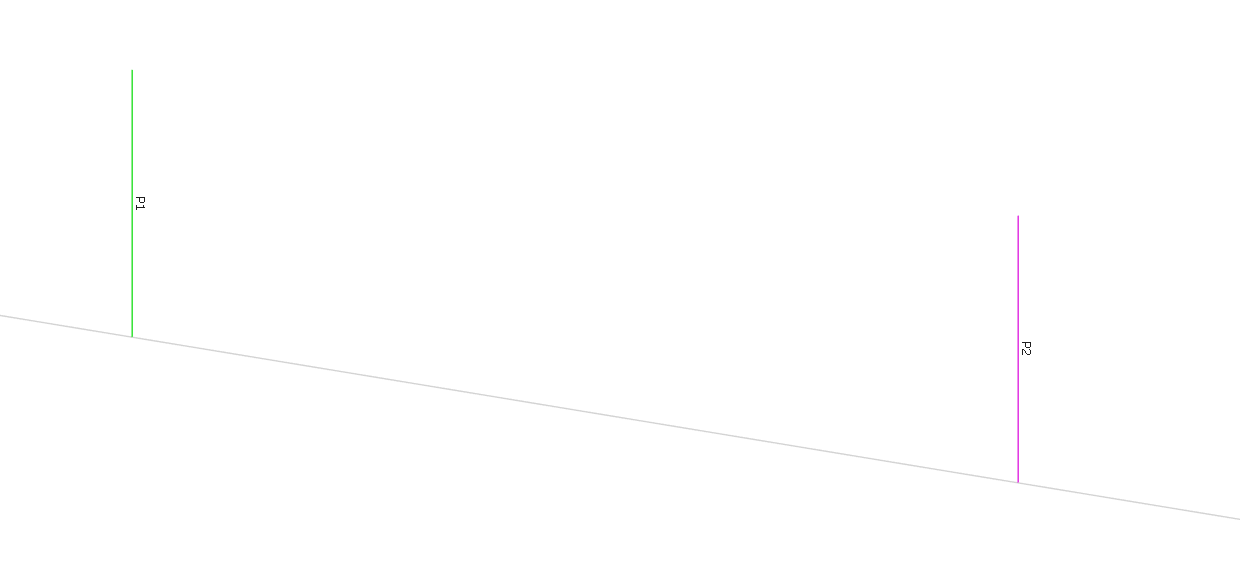
Assign column sizes using 📄 Member Sections and Materials For this example:
- P1 pedestal: 300 × 300 mm
- P2 pedestal: 400 × 400 mm
Step 2. Estimate the Footing Size
Before modelling the footing, estimate the required plan area using the allowable soil bearing pressure.
Calculate the total characteristic load:
1000+200+1400+300=2900 kN- Required footing area:
A=300/2900=9.67 m2 - A suitable initial footing size is therefore approximately 4.2 m × 2.3 m
- This preliminary sizing provides a starting point for the FE model. The footing dimensions may need to be adjusted after analysing the soil pressure distribution.
Before creating the footing, estimate the required plan area using the allowable bearing pressure. Calculate the rough footing size using the safe bearing pressure and the applied load.
The total characteristic column load is : Total Load on P1 + Total Load on P2
Total Loads = 100+200+1400+300
= 2900kN
Safe bearing pressure = 300kN/m2
Area required = 2900/300
= 9.6m2Assuming 4.6x 2.3m
Step 3. Create and assign properties for the FE surface
- Using Generate Members, draw the perimeter of the footing based on the estimated dimensions.
Create the FE surface using 📄 Add Slab, Wall, Ramp (FE Surface).
- Create > Add Slab, Wall, Ramp (FE Surface)
- Ensure the footing area matches the calculated plan dimensions.
Open Modify Geometry > Edit FE Options.
here were assuming a spring stiffness of 12000 kN/m³.
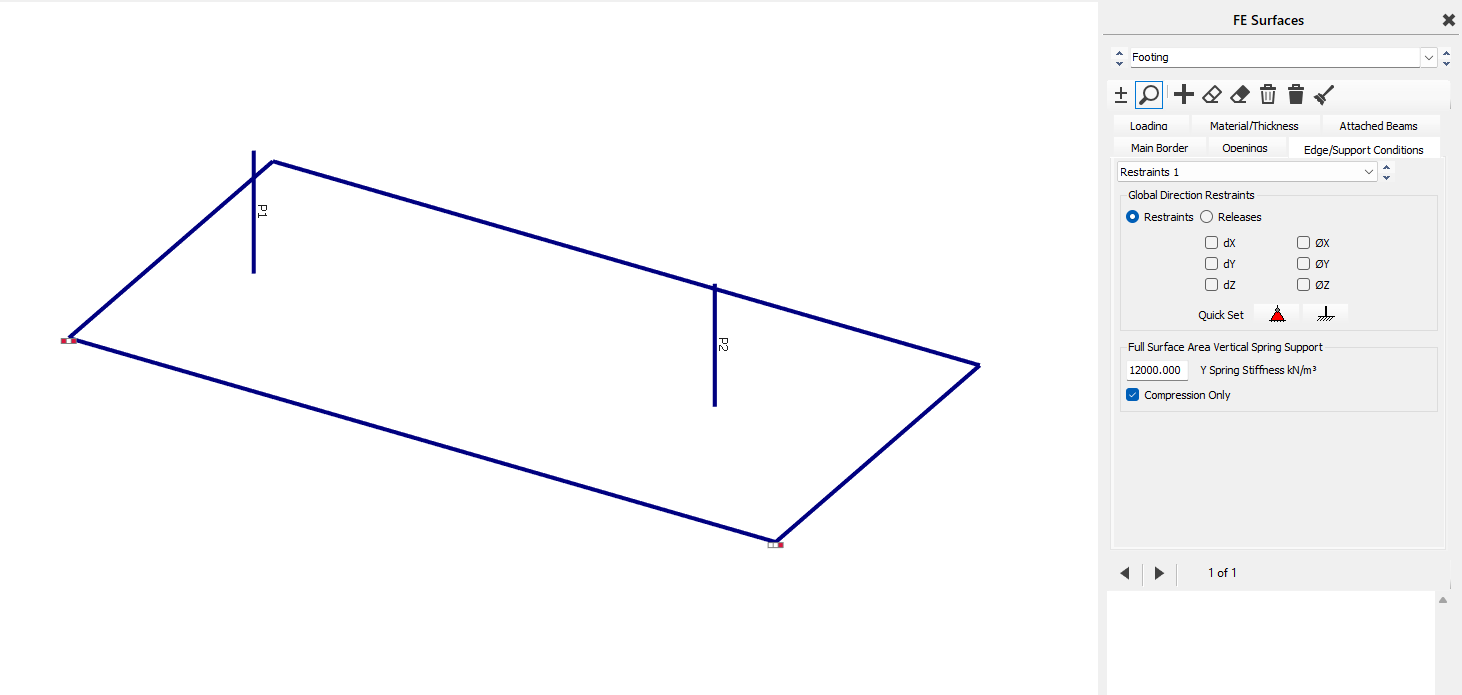
Additionally provide horizontal restraints ro prevent the slab from rotating using nodal static support
Refer : 📄 Edge Restraints and Releases
Step 4. Create the Load Cases and Combinations
- Apply the characteristic dead and live loads to each column using Loading > 📄 Member Loading.
- in this example The applied column loads are:
| Column | Dead Load | Live Load |
|---|---|---|
| P1 | 1000 kN | 200 kN |
| P2 | 1400 kN | 300 kN |

Confirm that the required load cases have been created.
For this example, the principal characteristic load cases are:
- D1: Dead load
- L1: Live load
Generate the required ultimate and serviceability load combinations using the 📄 Auto-Generation of Load Cases
Step 5. Analyse the Foundation
- Once the FE model is satisfactory, Run the FE analysis.
- Analysis>static analysis> space frame
Review the stress diagram and check if support reactions are within the limits:
- Soil pressure distribution
- Bearing pressure
- Total support reactions
- Uplift
- Loss of soil contact
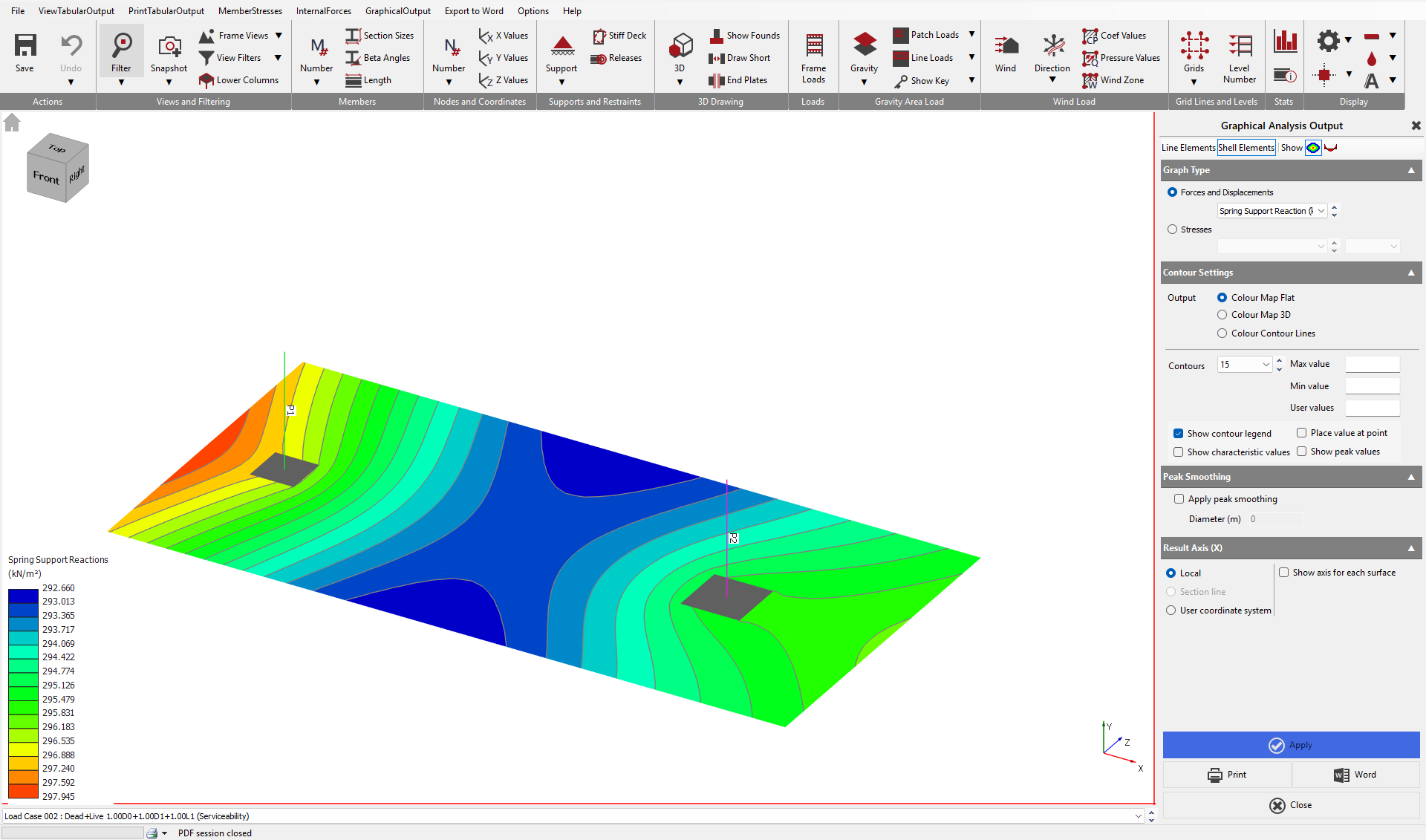
If excessive soil pressures or uplift are observed, revise the footing dimensions or thickness and repeat the analysis.
For this example, the maximum bearing pressure is less than 300 kN/m², therefore the footing satisfies the allowable bearing pressure requirement and the slab design can proceed.
Step 6. Slab Design
Once the FE model is satisfactory, select Design > Slab Design.
Set the project defaults, including:
- Concrete grade
- Reinforcement grade
- Cover
- Design code
Adding Basic Reinforcement
Under Slab Reinforcement Type, select Basic.
Add a new reinforcement set and apply it to the complete combined-footing surface.
Insert image
Provide initial top and bottom reinforcement in both slab directions.
For this example, the adopted basic reinforcement is:
Top Reinforcement
- T16 at 150 mm centres in Direction 1
- T16 at 150 mm centres in Direction 2
Bottom Reinforcement
- T20 at 150 mm centres in Direction 1
- T20 at 150 mm centres in Direction 2
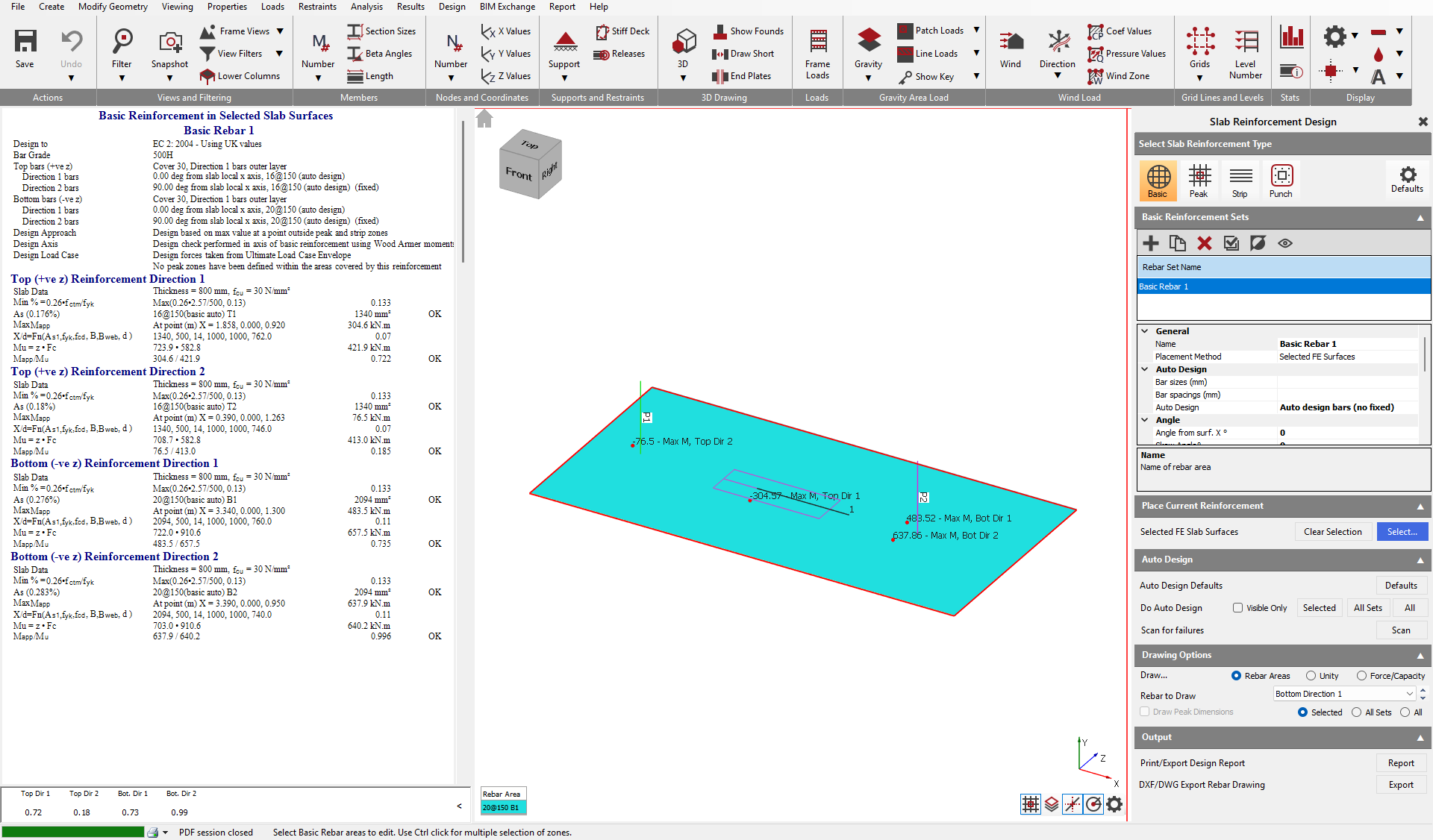
Review the reinforcement utilisation.
Areas requiring additional reinforcement will be highlighted in the graphical output.
For this example, the basic reinforcement is sufficient and no peak reinforcement is required.
Where the basic reinforcement is insufficient around a pedestal, select Peak Reinforcement and provide additional reinforcement locally.
One-Way Shear Checks
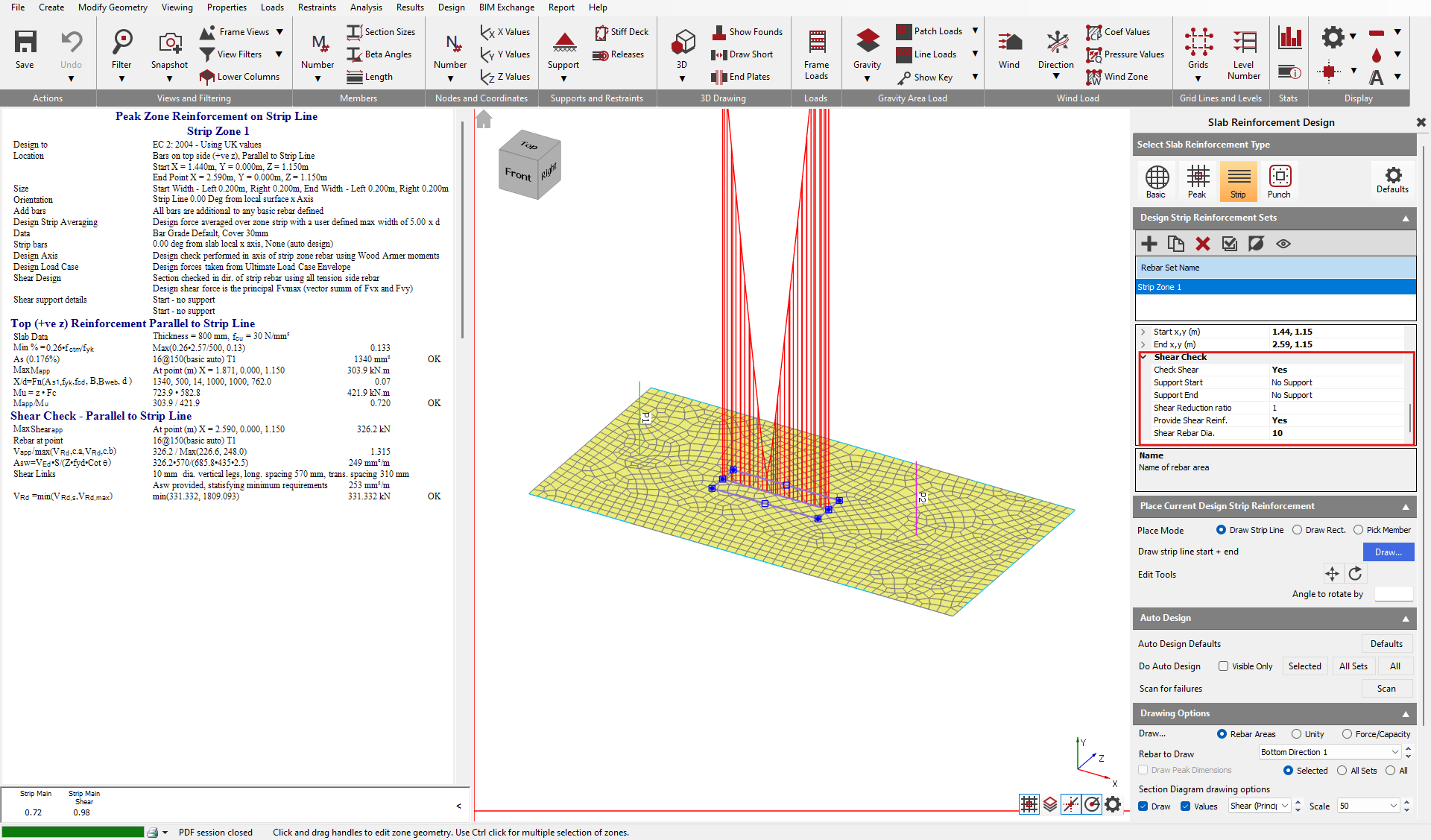
One-way shear is checked using design strips positioned at a distance d (the effective depth) from the face of each column.
- Create a design line strip at d distance from the column to check the shear at this face.
- Enable the shear check and review the results.
- For this example, additional shear reinforcement is required.
In this example provide:
- 8 mm shear reinforcement as required by the design.
Punching Shear Checks
- Under Slab Reinforcement Type, select Punching Shear.
- Add a punching shear check at each pedestal location.
- Create a punching shear check for each column and assign the relevant punching surface.
- For this example, the punching perimeter extends beyond the footing edge for both columns.
- As a result, punching shear checks are not required.
