
Site Data Wind Analysis (with SCIPHYR & Google Maps) Integration

The MasterKey Wind Analysis Site Data is based on a third party piece of software that integrates seamlessly with MasterFrame (Pro). In the Site Data interface there is the main map of the UK or Ireland alongside a more detailed local map. There are also 2 circular diagrams based on the chosen site location, one indicating your structure surrounded by 30 degree segments and the distances to sea, country and town displayed in blue, green and red. The second diagram indicates the distribution of wind pressure around your structure. Below the main maps, the calculations are displayed.
You can select the site data from the Wind Site map by clicking on the .png) button in the right hand panel or from the Loads > Wind Panel Loading (Pro) > Site Data Wind Analysis menu.
button in the right hand panel or from the Loads > Wind Panel Loading (Pro) > Site Data Wind Analysis menu.

Once in the site data you can select the particular site for your building by;
- Picking the site location from the GB site map
- Picking the site location from the Irish site map
- Manually inputting the national grid reference NGR
- Inputting the site’s Eastings and Northings
- Select the location using postcode
You can examine the wind pressure values calculated by scrolling to the bottom of the output screen. You will see that wind pressure values are determined for the different heights in the structure, for each wind direction specified and also for each wind diagonal.
Select File> Exit MasterKey Wind Analysis, to take you back into your model. The dynamic wind pressures for the site will have been automatically applied to your model on exiting the Wind Analysis.
For a building outside of the Britain Isles click on the ‘Set Default Site’ button in the Site Data tab, then enter the relevant site data as described in Site Data Wind Analysis – Background section below.
For additional information on the site data, local obstructions, fetches and topography see Site Data Wind Analysis – Background section.
Wind Graphics Pane
The MasterSeries 2024 update introduces a complete root-and-branch rewrite of the wind site analysis interface through the implementation of the new SCIPHYR toolkit.
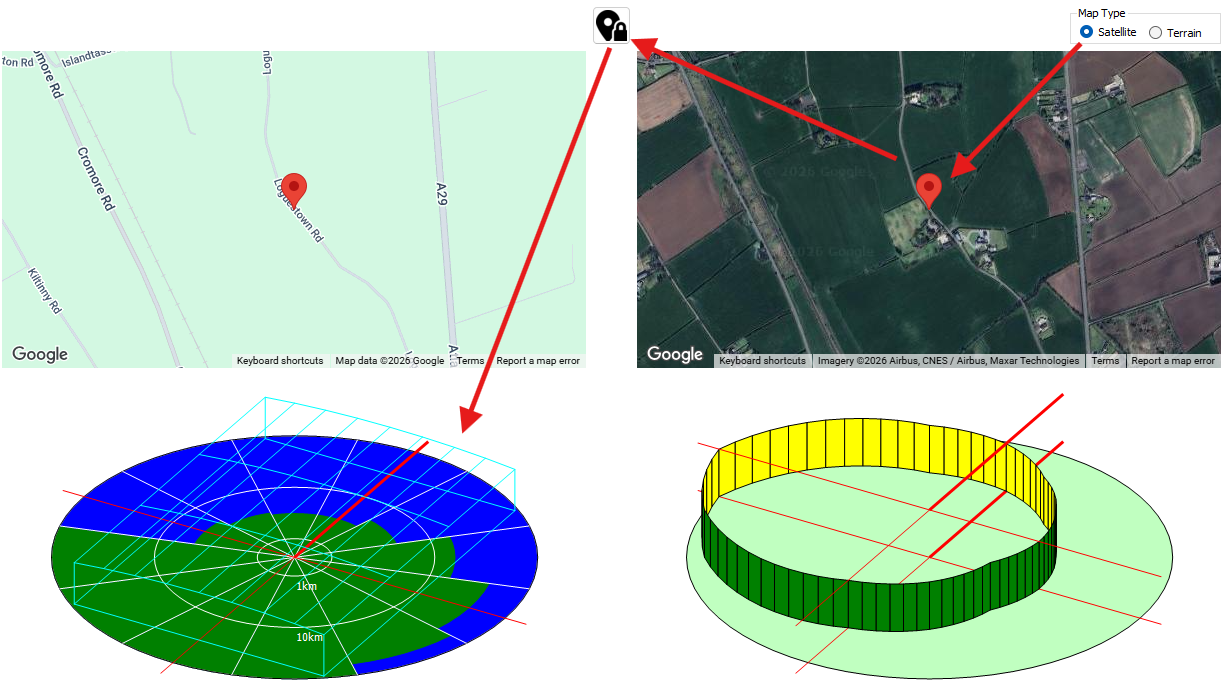
Google Maps Integration
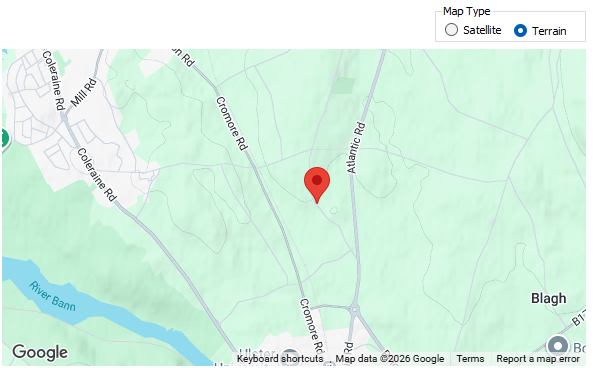
Map Type
The interface provides both road map and satellite map viewing options, offering an intuitive way to visually locate, interact with, and verify your exact site. Users can dynamically click directly on the Google Map to choose or update their site location, and the software will instantly retrieve the data and recalculate the wind site analysis for that specific spot.
Map Validation
Furthermore, the satellite and terrain map viewing options act as vital verification tools for the engineer.
- The satellite view allows users to visually inspect local site obstructions, such as surrounding buildings or trees, to ensure the software has correctly captured the site context.
- Similarly, the terrain map helps confirm whether the surrounding topography is generally flat or if there are significant hills and geographical features that must be accounted for.
SCIPHYR Site Maps and Polar Graphs
Alongside the interactive Google Maps, the layout features two circular polar diagrams that graphically visualise the SCIPHYR environmental data based on your chosen site location. The primary polar graph illustrates the roughness categories surrounding the structure, divided into 30-degree radial segments. These segments display the fetch distances to different terrain types using a strict colour-coded system: blue represents the sea, green represents the countryside, and red represents town or city obstructions.
Read more here: 📄 SCIPHYR to MasterFrame Wind Pressure Values
The fetch distances on this polar graph are plotted radially using a logarithmic scale. This allows the diagram to neatly display massive geographical distances, featuring distinct reference marker lines at 1 km, 10 km, and extending all the way out to 100 km from the site.
Choosing a Site Location from the Wind Data Map
A location is chosen from the MasterKey Wind Analysis site data map for Great Britain or Ireland, or if outside these areas a default site can be set up to generate the wind pressures for a particular location. Pick a site directly off the map or enter the site grid references, if known, to get exact site information. (Note - grid references can be obtained from various internet sites, for example, www. multimap.com, based on the site address or post code.) You can also enter the eastings and northings, if known.
Accurate wind and topographical information is contained within the Wind Map database. This information is used by the program to obtain the wind pressures on a structure as it varies with height and orientation. Several wind diagonal lengths can be taken into account. The user can choose which analysis method to employ.
Site Data Tab
The Site Data tab enables you to enter a title reference and select which map type to be the main graphic. You can choose between the GB site or Irish site maps. The grid references are shown here and can be manually changed if you know the exact grid references for your particular site. The basic wind speed and site altitude are given. The data for a particular site can be saved as an independent file for future re-loading (Save/Load Site to file). If the site is outside Great Britain or Ireland, you can set up a file containing a default (overseas) site, using the Set Default Site button. The site information for an overseas site is manually entered in the following tabs, so that the wind pressures can be accurately calculated.
You can also specify an SP Value - Risk Value of 10,000 years, which is used in the wind site risk factor allowing for analysis and design of diverse structures.

Site Location
User Defined
The User Defined Site option is primarily used when the building is located outside of Great Britain or Ireland, where built-in map data is not available. When this box is checked, the software bypasses automatic terrain database retrieval, requiring the user to manually enter relevant site information, such as basic wind speed, distances to town/sea/country, and topography data to accurately evaluate wind pressures.
Set Location From
Type and Value
This input area allows you to choose the method for pinpointing your project site.
- Type: A drop-down menu where you select the identification format, such as Postcode, Ordnance Survey Reference (National Grid Reference), Easting and Northing, Latitude/Longitude, or EirCode (for Irish sites).
- Value: The specific alphanumeric code or coordinate corresponding to the chosen type (e.g., entering "BT38 7BE" when the type is set to Postcode).
Town Selection
Also known as Fast Site Selection, this feature provides a drop-down list of major towns and cities. Selecting a town from this list allows for a quick, rough location of the site on the built-in maps, which can then be further refined using grid references or manual map interaction.
Review or Set Wind Site Inputs
Basic Wind Speed (m/s)
Change Basic Wind Speed.
Site Range (m)
The Site Range defines the radius from the chosen site location over which terrain and environmental information is captured. In MasterSeries 2024, this range can be adjusted to a minimum of 100m, with 500m being a common default for capturing detailed terrain variations. This input ensures the analysis reflects an accurate Site Range from the exact point where work is being performed.
Sp Value - Risk (Years)
The Sp Value relates to the Probability Factor, which adjusts the wind analysis based on the required statistical risk level.
- Standard design usually follows a 0.02 annual probability of exceedance, which is equivalent to a mean return period of 50 years (set as "Once in 50 year").
- Users can increase this value for monumental buildings (e.g., 1 in 120 years) or decrease it for structures like agricultural buildings (e.g., 1 in 25 years) to adjust the resulting wind loads accordingly.
Frame angle to North
Change frame angle to North
Wind Season
Season
The Wind Season parameter allows for the modification of wind speeds based on specific sub-annual exposure periods.
- While permanent buildings default to "All year" (a seasonal factor Ss of 1.0), this setting is used for temporary structures or buildings in the construction phase that will only be exposed during specific months.
- The software uses this to account for the fact that the strongest winds in the UK typically occur in mid-winter, while June through August are generally less windy.
Season Start
Change start month.
Calculation Preference
Recalculate after every change
This preference enables a real-time, automatic update of the wind analysis. When active, any change made to the site data such as moving the map marker or changing a factor—causes the program to immediately recalculate all required q (dynamic pressure) values for the frame at various building levels.
Recalculate on demand
In this mode, the software does not update the site analysis until triggered by the user. This is typically actioned by clicking the "Recalculate Site" button (found between the map views) or "Refresh MasterKey Wind Cpe Values". This is useful when making multiple manual adjustments or refinements to the site topography and obstructions before committing to a full re-analysis of the wind pressures.
The Site Data tab also allows you to specify the orientation of your building relative to the North, so as to ensure accurate application of the wind loading to the individual faces of the structure.
Obstructions Tabs
If there are obstructions in the vicinity of the structure being examined, these can be taken into account by specifying the height of and distance to the obstructions at intervals of 30 degrees around the building. These are normally automatically entered from the in-built database, but can be overridden if desired.
If the orientation of the building is known, the UK Sd factors can be used to reduce the wind pressures around the building. If the orientation is not known or is outside the UK or Ireland, the Sd factors should be set equal to 1.

Sea/Country/Town Tab
Fetch distances and category types are automatically included when a site is selected from the Great Britain/Ireland map. For a site outside Great Britain/Ireland, the values can be entered manually for each orientation.

Topography Tab
The local topography can be taken into account resulting in modification of the wind loading. This can be done using the internal data within the wind map or altered manually.
There is an option to use the site altitude only to evaluate the wind loading ignoring the effects of local topography.

Report (Output) Tab
On the Report (Output) tab, the user can select which method to employ for the calculation of the wind loads – Standard, Hybrid, Directional or Designer’s Guide. Having settled on the appropriate method, the screen and printing output options can be selected. The basic wind speed automatically selected from the map may be changed if desired, as can the start and length of the season under consideration. Building floor levels and wind diagonal lengths can be changed from the defaults if necessary (note – when used in conjunction with MasterFrame (Pro), these values are automatically taken from the model). Select the risk period from the droplist. Finally the graphics scale and number of segments can be varied. The wind pressure diagram can be viewed for each wind diagonal length a, if applicable

Videos
Skip to 01:25 Introduction to the New SCIPHRY Integration (including Google Maps)
Skip to 12:50 - Wind Site Data Updates including SCIPHYR and Integrated Google Maps
Further Help
Some further resources on the SCIPHYR Site Data Wind Integration