Load Take-down
The yield line analysis is primarily an ultimate limit state check used to determine the wall’s lateral, out-of-plane capacity and the corresponding plastic failure load factor. However, these lateral checks are not carried out in isolation from the other actions on the wall.
The MasterKey Masonry module also performs a vertical load takedown by dividing the wall into a series of vertically spanning regions based on the positions of the lateral restraints. Vertical loads are then distributed using code-based methods. For more complex and multi-level panels, the software no longer relies on a single representative location for the whole wall; instead, it assesses the load takedown and buckling behaviour separately within each vertically spanning region.
For each region, the software samples forces at a number of vertical positions, such as mid-height of a particular segment, to identify the local axial and buckling effects. It then reviews all of these positions and reports the most critical case, including the exact location in the panel where the governing axial force or buckling force occurs.
Because vertical load influences masonry bending capacity, the yield line analysis continuously accounts for the applied vertical actions. As a result, any change to the vertical loading requires the yield line analysis to be re-run so that the wall’s out-of-plane capacity is updated correctly.
A pictorial display of the load take-down on the inner and outer leafs can be drawn on the wall elevation. This is especially useful around openings and under point loads when the load path can be shown and the values included. It is displayed for the loading at half height of the wall.Select the Take-down icon and then display the inner leaf load or outer leaf load as required.
Vertical Load Take Down and Design Approach
The software checks the wall panel against various ultimate limit state criteria, including axial compression and buckling, taking into account the material strengths, geometric slenderness, and eccentricity of applied vertical loads..png)
Multi-Storey Load Takedown (Masonry Walls)
The 2025 release of MasterKey Masonry introduces a robust multi-storey load takedown system, enabling engineers to model and analyse full-height masonry panels across multiple levels. This enhancement allows vertical and lateral loads to be distributed floor-by-floor, with code-compliant force spreading and buckling checks between intermediate supports.
Key Features and Methodology
Segmented Wall Analysis: Walls are divided into vertically spanning segments between lateral supports. Each segment undergoes independent load takedown and buckling analysis, ensuring accurate force tracking and stability assessment.
Code-Based Load Distribution: Concentrated loads are spread at a defined angle (typically 60°), following Eurocode principles. MasterSeries extends simplified code cases to handle complex multi-storey scenarios.
Critical Force Reporting: The software samples axial and buckling forces at various heights, identifying and reporting the most critical values and their locations.
Flexible Load Application:
- Point Loads can be applied at any height within a panel, accommodating intermediate floor beams and slab loads.
- Uniformly Distributed Loads (UDLs), including dead and live loads, are supported.
- Cavity Walls allow independent application of concentric and eccentric loads on both inner and outer leaves.
Visual Load Paths: Distribution lines illustrate how loads traverse the wall, including around openings, helping engineers verify load paths across storeys.
Stability and Lateral Support Checks: The system performs detailed out-of-plane stability checks, crucial for resisting lateral forces such as wind - often the governing factor in multi-storey masonry design.

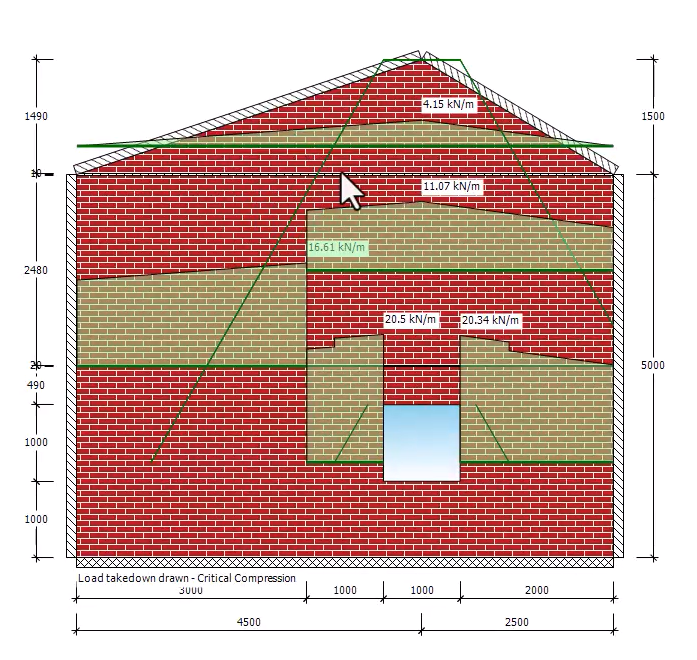
Critical Load Case Display Control
The user can choose whether the load take down diagrams display compression, buckling, or tension as the governing case. This makes results clearer and avoids confusion in multistorey or complex wall panels, where different critical cases may apply at different levels.
The reported critical compression and buckling locations correspond to the governing sampled positions used for the local stress and buckling checks; see 📄 Load Take Down In MasterSeries for further explanation.
This feature enhances clarity by tailoring the graphical output to highlight the most relevant failure mode for each segment. It aligns with the program’s internal sampling of forces and helps engineers focus their review on the most critical conditions, storey by storey.
Click on General Settings in MasterKey Masonry.
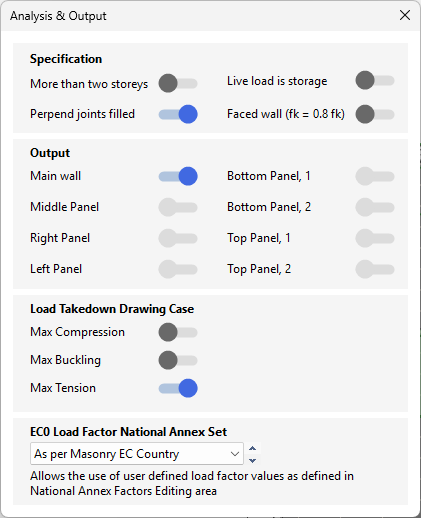
Under Load Take Down Display Options, select which critical case to show:
Compression – governing vertical stress.
Buckling – stability check per storey.
Tension – pull-out / overturning cases.
Re-run or refresh diagrams.