
Beam Section Setup Data Tab
On the Beam Section Setup Data tab you can define the concrete slab details.
The following decking arrangements can be catered for within the software:
- Metal Deck Profiles
- Precast Hollowcore & Solid Slabs
- In-situ (including Hoesch Decking) Slabs
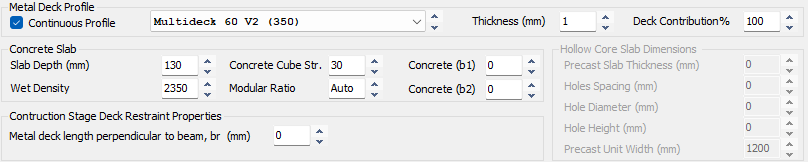
Metal Deck Profile Inputs
Users can select a range of Metal Deck Profiles, or a Solid Slab
With a metal deck profile selected from the dropdown list (rather than a solid slab), profiled deck specific options appear.
With the solid slab profile selected from the dropdown list, solid slab specific options appear.
Details are below.
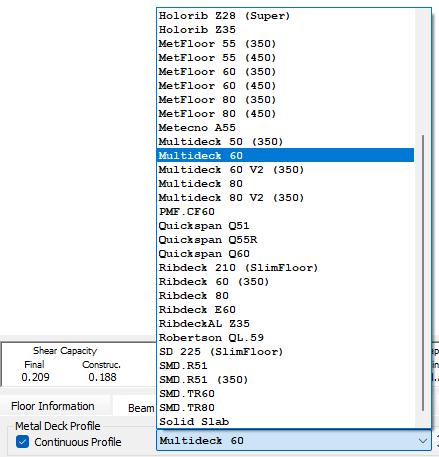
Profiled Decking
For a profiled metal deck flooring, you can choose the specific profile from the drop list of cross sections. Note that this list can be added to in the 📄 Open Library' tab if your particular cross section is not currently included.
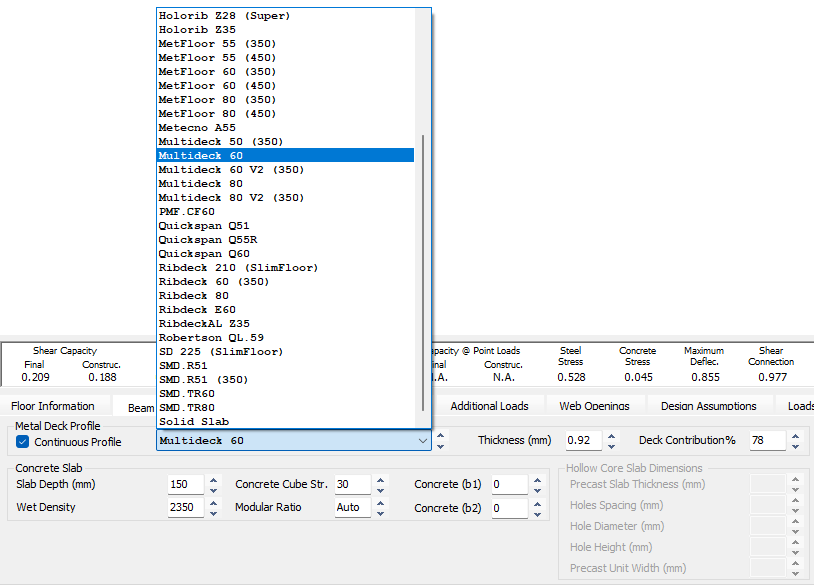
Note, the 📄 Open Library (Composite) tab will allow the user to add more profiles to this list. 📄 Open Library
Continuous Profile (Checkbox)
This setting directly influences how the software calculates the beam's shear capacity, particularly for primary beams:
- Primary Beam Calculations: Because BS 5950 is somewhat unclear regarding deck contribution for primary beams, the software provides an option to include or ignore it. If the user chooses to include the deck's contribution, the software will only apply it if the profile is specified as continuous over the beam.
- Discontinuous Decking: If the decking is discontinuous, or if the deck ribs run parallel to the beam, the program automatically reverts to a conservative assumption and completely ignores the deck's contribution to the primary beam.
Thickness (mm)
The specified thickness (mm) of the profiled metal deck sheeting.
Deck Contribution %
This modifies the percentage of the deck's contribution to the longitudinal shear resistance of the flange, based on the distance 'a' between the centre of the shear studs and the rib edge (within the trough).
For 'a' =1.65 d (stud diameter) a deck contribution value of 69% is used, for 'a' = 2d use 78%, for 'a' = 2.5d use 90% and for 'a' =2.9d use 100%.
Solid Slab Profile
Within the dropdown Specify for Precast Solid / Hollow Core, or In-situ Concrete Slabs

Reduce from base (Checkbox) (Precast Solid / Hollowcore Slabs Only)
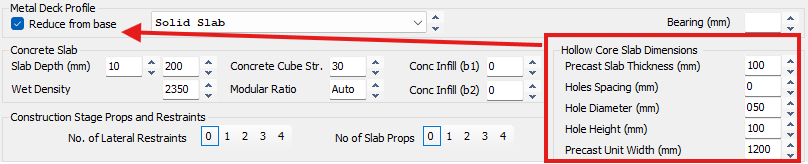
When a hollowcore or precast slab is defined, Reduction in slab depth, (i.e. the left field of Slab Depth (mm) entry will change:
- Checked: Reduction will be taken from the bottom of the slab, thereby leaving the top level of the slab unchanged and by association leaving the overall depth of the steel/concrete composite section unchanged.
SCI Publication P287 Figure 3.3 illustrates the need for this when using precast slabs. - Unchecked: the reduction in slab depth will be taken from the top of the slab, thereby reducing the overall depth of the steel/concrete composite section.
Bearing (mm) (Precast Solid / Hollowcore Slabs Only)
Bearing length (mm) of precast slab on to steel beam.
Concrete Slab Inputs
The concrete slab depth setting change depending on what type of slab is defined. The different inputs available below include:
- Profiled Decking
- Concrete Precast / Hollowcore Slabs
- In-situ (including Hoesch Decking)
Slab Depth (mm)
Profiled Decking Slab Depth Options
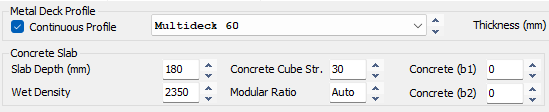
The full depth (mm) of the profiled concrete slab from top of slab to bottom of trough. The software will calculate the self weight of the profiled slab from the associated data held within the Open Library.
Precast Slab Depth Options
When Hollow Core Slab Dimensions are populated the Slab Depth fields work differently. Hereafter the slab depth will refer to the depth of the precast concrete slab plus the instu concrete topping.
The specified thickness (mm) of the concrete slab is input in two parts, and the slab depth is now made up of two parts, precast solid concrete slab plus insitu concrete topping.
Precast Hollowcore Slab (with cast instu topping)
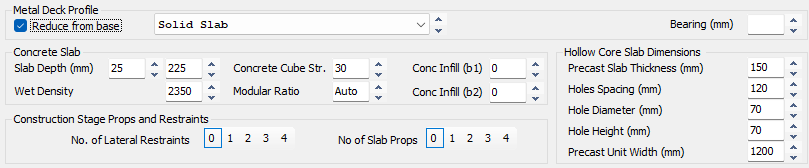
Precast Solid Slab (with cast instu topping)

The specified thickness (mm) is input in two parts.

Reduction in Slab Depth: Precast Slabs (Left Field) (mm)
The left field specifies the reduction in slab depth for the purposes of calculating the composite section properties only, this reduction will not affect the self weight of the slab.
This is particular to precast slabs as the joints between slabs can only be partially filled at best, SCI Publication P287 Figure 3.3 illustrates the need for this when using precast slabs.
Total Slab Thickness: Precast Slabs (Right Field) (mm)
The right hand field specifies the total thickness (mm) of the composite concrete slab i.e. precast solid concrete slab plus insitu concrete slab, without reductions.
In-situ Slab Depth Options (inc. Hoesch Decking)

The specified thickness (mm) of the solid concrete slab is input in two parts.
Reduction in Slab Depth: In-situ Slabs (Left Field) (mm)
The left field specifies the gap (mm) between the top of the beam and the bottom of the concrete slab
Non-profiled cast insitu slab
This should be set to zero or left blank

Hoesch Decking
Creating a gap between the top of the steel and the slab soffit is only applicable when using Hoesch decking (or similar).

With Hoesch decking (or similar) the soffit of the slab may be higher than the top of the beam, with the troughs lower than the top of the beam and not contributing to the composite action.
Total Slab Thickness: In-situ Slabs (Right Field) (mm)
The right hand field specifies the thickness (mm) of the concrete slab only, excluding troughs. As such, the designer must take account of the trough self weight and add this weight to the slab weight.
Wet density (kg/m³)
The wet density of the concrete used to form the slab.
Modifying will affect self-weight and composite section elastic properties.
Concrete Cube Strength (MPa)
The characteristic compressive strength of the concrete being used to form the slab, this relates to the cube strength of the concrete whether designing to British Code or Eurocode. This can be set to zero for non-composite design.
Reset Non-Composite Design Briefs (0 Concrete Grade)

To set all non-composite briefs with 0 concrete grade to the current default making them composite, go to ‘MasterFrame> Set all briefs 0 fcu to default value (non-composite to composite)’


Modular Ratio
The modular ratio in composite beam design is a factor used to transform the cross-sectional area of the concrete slab into an equivalent area of structural steel.

This transformation allows designers to calculate the second moment of area of the composite section, which is essential for performing elastic analysis and calculating beam deflections
You can manually select code-specific modular ratios
- 10 for normal weight concrete
- 15 for lightweight concrete
- 'Auto' allows the program to calculate the exact effective ratios automatically based on the specified concrete grades and loading conditions.
Concrete (b1) & (b2)
b1 and b2 values represent the effective width of the concrete flange acting compositely on each side of the steel beam. The b1 and b2 input fields allow you to manually override these defaults by inputting your own specific dimensions in millimetres.
You would typically need to reduce the b1 or b2 values if the physical width of your concrete slab is restricted. Common scenarios where you must manually adjust these values include:
- Floor Openings: If there are openings in the floor situated close to the beam, they interrupt the slab and reduce the available concrete flange width.
- Closely Spaced Beams: If adjacent supporting beams are spaced closer together than the maximum allowed full flange width (e.g., less than Span/4), the effective width must be reduced so that the beams are not "sharing" the same overlapping area of concrete.
Eurocode
Default (b1) & (b2) values are:
- Span/8 (Lz/8) (max) on each side of the beam
British Standards
Span/8 (Lz/8) (max) on each side of the beam for
Profiled Decking
Precast slab with cast instu topping
Precast hollowcore slab with cast instu topping
When slab depth of 100mm or less (≤ 100mm)
Assuming all cores filled
Span/16 (Lz/16) (max)
Precast hollowcore slab with cast instu topping
When slab depth greater than 100mm (> 100mm)
- The software assumes that all cores have been filled from slab end to the extent of the flange, so that the ends of the hollowcore slabs are solid, and without voids. If this is not the case then the reduction in slab depth (discussed previously) should be equal to the precast slab depth, as compression transfer will not be possible.
This must be reduced further if the length of the filled cores (note, all cores must be filled) within the hollowcore slab extend less than Lz/16 from the centre-line of the beam.
Hollow Core Slab Dimensions
Precast Slab Thickness (mm)
The specified thickness (mm) of the precast concrete slab.
With no core data specified, or a precast slab thickness less than 150mm, the software will assume a solid precast slab.
With core data specified and a precast slab thickness not less than 150mm the software will assume a precast hollowcore slab. A typical core includes a semi-circular section at top and bottom with a rectangular section spanning between.
Holes Spacing (mm)
Horizontal spacing (mm) of cores along the precast hollowcore slab section.
Hole Diameter (mm)
Diameter (mm) of semi-circular sections at the top and bottom of a core, and by association this dimension also specifies the width of the core.
Hole Height (mm)
Total vertical height (mm) of the core from the bottom to the top, including the semi-circular sections.
Precast Unit Width (mm)
The width of a single precast unit (solid or hollowcore). Change affects stud factor K - SCI287 4.4.3
Slab Examples
100mm deep solid precast slab (example)

Typical specification for a 100mm deep solid precast slab. With no core data specified, or a precast slab thickness less than 150mm, the software will assume a solid precast slab.
150mm deep precast hollowcore slab (example)

Typical specification for a 150mm deep precast hollowcore slab. With core data specified and a precast slab thickness not less than 150mm the software will assume a precast hollowcore slab.
Construction Stage
Deck (Metal) Restraint Properties (Eurocode Only)
Metal deck length perpendicular to beam, br (mm)
Defines the minimum local span/panel length of profiled metal decking measured perpendicular to the beam (i.e. the depth of the diaphragm).
It is used in the construction-stage lateral torsional buckling check where the deck is assumed to provide restraint to the steel beam before the concrete has cured and composite action has developed.
This input is relevant where the decking spans perpendicular to the beam and is adequately fixed, typically by through-deck welded shear studs.
This value is taken into account in the calculation when 'Propped' has been specified in the 📄 Floor Information tab.
Props and Restraints (Precast Slabs Only)
No. of Lateral Restraints (construction stage only)
During construction stage the beam could be considered to have lateral restraint depending upon the construction method used. If this is the case, you can add a number of lateral restraints to reduce the effective length of the beam and hence increase its buckling moment capacity.
Precast Slab Restraints
A precast slab bearing on a beam will provide the beam with a certain amount of restraint against lateral torsional buckling.
Beam lateral restraint
The amount of lateral restraint provided to the beam at construction stage can be modeled in terms of 0-4 lateral restraints evenly distributed along the beam.

No. of Slab Props (construction stage only)
It may be the case that the precast slabs will be propped along their length during construction. Add the number of props used to reduce the loading on the beam at construction stage.
Precast Slab Propping
Construction stage props assume that precast slab units are temporarily supported with 0-4 props evenly distributed along the slab span, hence reducing the construction load transferred to the beam. If the beam has been propped then propping the slab will provide no benefit, however if the beam is unpropped, propping the slab can significantly reduce the construction loading on the beam.

Both options can be used together if they reflect the intended construction method, but the propping arrangement should be confirmed with the contractor.
Old Manual Entry
Profiled Decking
.png)
For a profiled metal deck flooring, you can choose the specific profile from the drop list of cross sections. Note that this list can be added to in the 📄 Open Library' tab if your particular cross section is not currently included. The thickness of the profile can be specified and whether the profile is continuous over the beam (considered as adding to the transverse reinforcement). The percentage of deck contribution can be modified, depending on the distance 'a' between the centre of the studs and the end of the sheeting. For 'a' =1.65 d (stud diameter) a deck contribution value of 69% is used, for 'a' = 2d use 78%, for 'a' = 2.5d use 90% and for 'a' =2.9d use 100%.
Details of the concrete slab are entered. The wet density is in kg/m3. The modular ration between the steel and concrete can be defined as 10, 15 or 'auto' where the program will automatically calculate the ratio. When the composite action is being considered, the program will assume a contribution of the concrete slab as beam span/8 each side of the beam. You can override this concrete slab distance to each side by inputting your own dimension in mm. This is particularly useful if the slab is limited by openings in the floor close to the composite beam.
Solid/Hollowcore Slab
.png)
For a solid slab or hollowcore slab, select 'Solid Slab' from the drop list of profiles. Enter the overall depth of the slab. If a hollowcore unit is being employed, enter the dimensions for the unit. These will be used to calculate the weight of the floor slab.
During construction stage, the beam could be considered to have lateral restraint depending on the construction method. If this is the case, you can add a number of lateral restraints to reduce the effective length of the beam and hence increase its buckling moment capacity.
It can also be the case that the slabs are propped during construction. Add the number of props to alter the loading on the beam in the construction stage.