
Beam Data
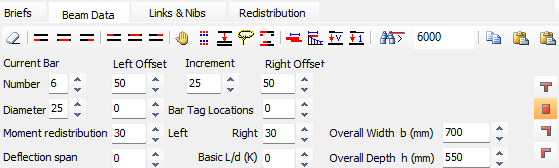
In the beam data tab you can change the number, diameter and length of the currently selected bar. You can also change the bar tag locations for improved clarity.
The percentage redistribution can also be set for each end of the member. This allows you to optimise their design by only redistributing as required. It should be noted that this redistribution is carried out in isolation and the user should check the adjacent spans and apply the same percentage there. The redistribution tab gives a more global method.
The span length to be used in the deflection calculations and the basic L/d to be used can also be modified.
The sections buttons and input boxes allow you to adjust the member cross-section. This is interactive with all results being updated. You should re-analyse the frame after all sections are modified and check for any transferred moments due to changes in member stiffnesses using the .png) button.
button.
| Erase the currently highlighted (in red) bar. |
| Insert a bottom left bar. |
| Insert a bottom middle bar. |
| Insert a bottom right bar. |
| Insert a top left bar. |
| Insert a top middle bar. |
| Insert a top right bar. |
| Mirror (hand) all reinforcement in the beam. |
| Swap the currently highlighted bar (in red) between the inner and outer layers. |
| Split the currently highlighted bar (in red) into two sets of bars. 4T32 => 2T32 & 2T32. Allows for different curtailment points or moving one set onto another layer. |
| The lasso. When active all bars under the drag point move simultaneously instead of the default of just the highlighted bar (in red) |
| Creates symmetrical reinforcement (main and shear) in the current beam based on the beam end with selected (red) support steel. Function is disabled when central steel is selected. |
| Automatically re-lap the nominal reinforcement to the main reinforcement for the current member. |
| Automatically re-curtail the currently defined main reinforcement and then relap for the current member. |
| Match the support reinforcement to either side of each support for all Visible designed beams. |
| Match the support reinforcement to either side of each support for the current beam only. |
| Scans all the beams and stops if it finds a bar longer than the value set in the drop list. |
| Copy the current beam details to the clipboard. |
| Paste the beam details from clipboard to current member (straight copy). |
| Paste the beam details from clipboard to current member (mirror copy). |
.png)
.png)
.png)
.png)
.png)
.png)
.png)
.png)
.png)
.png)
.png)
.png)
.png)
.png)
.png)
.png)
.png)
.png)
.png)
.png)
Current Bar
Number
Refers to the quantity of reinforcement bars within the currently active bar group. Users can increase or decrease this number to ensure the beam has a sufficient area of steel to meet capacity requirements.
Diameter
Specifies the size (diameter in mm) of the reinforcement bars for the selected group. Changing the diameter immediately triggers a recalculation of the beam's moment capacity.
Moment Redistribution
See main article on 📄 Redistribution

This input allows for post-analysis adjustments to beam support moments. By specifying a percentage (e.g., 15% or 20%), peak moments are redistributed to mid-spans, helping to optimize the reinforcement layout.
Deflection Span
An input used to define the physical span length for deflection check calculations. It establishes the "L" value used in span-to-effective-depth (L/d) ratio checks.
Length
The total physical length (in mm) of the reinforcement bar currently selected for editing.
Increment
Defines the step value (e.g., 25 mm) used when reinforcement bar lengths or offsets are adjusted graphically using the mouse.
Bar Tag Locations
A field used to adjust the graphical position of reinforcement labels (tags) on the design elevation drawing for better clarity.
Right and Left (Offsets)
These define the distance from the beam's left or right supports to the start or end of the currently active reinforcement bar.
Basic L/d (K)
This represents the basic span-to-effective-depth ratio constant (K) derived from design codes. It serves as the baseline to determine if a section is deep enough to satisfy serviceability deflection limits without requiring a rigorous explicit calculation.
Overall Width b(mm)
The total width of the concrete beam's cross-section. Modifying this value will immediately update the moment and shear capacity calculations.
Overall h (mm)
The total depth or height of the concrete beam section. This value is used by the software to calculate the effective depth (d), which is critical for determining the section's ultimate moment and shear capacities.