
Loads, Cases, Deflection
The Loads, Cases, and Deflections tab allows for the manual definition of all structural actions and serviceability criteria required for a composite beam design.

Loading Cases
Depending upon which Design Code has been selected, the software will request the appropriate Load Factors for each Load Case.
Using BS 5950
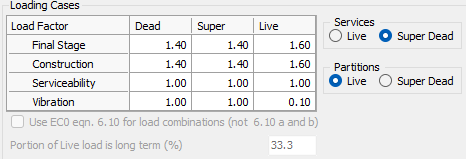
When using BS 5950, the software will allow the user to input load factors for dead, superimposed dead, and live loads for each of the four load cases shown. The construction load case considers the beam in it's non-composite state whilst the concrete slab is being poured, all other load cases are applied to the composite beam.
Service loads and partition loads can be considered either as a live load or as a dead load.
Using Eurocode
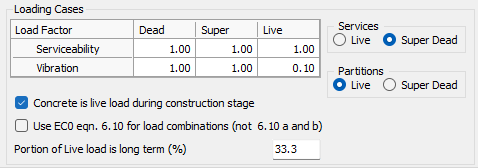
When using Eurocode, the software will allow the user to input load factors for dead, superimposed dead, and live loads for the two load cases shown. Both load cases are applied to the composite beam.
Service loads and partition loads can be considered either as a live load or as a dead load.
Concrete is live load during construction stage
The user has the choice to select the wet concrete load at construction stage as a live load rather than as a (default) dead load (when considering unpropped construction).
Use EC0 eqn. 6.10 for load combinations
The user has the choice to select EC0 equation 6.10 for the load combinations, and not the (default) more onerous case of either 6.10a or 6.10b.
Portion of Live Load is long term %
The user can directly input the portion of live load that is long-term (typically 33.3%)
Deflection Limits
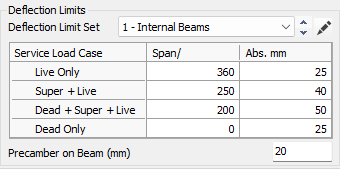
Deflection Limit Set

The Deflection Limit Set includes a dropdown list of all pre-configured length/depth deflection limits. Selections from the dropdown list will populate the table for review, and the software will use these values to check against the actual deflection of the beam.
To add more groups to the Deflection Limit Set, use the edit button 
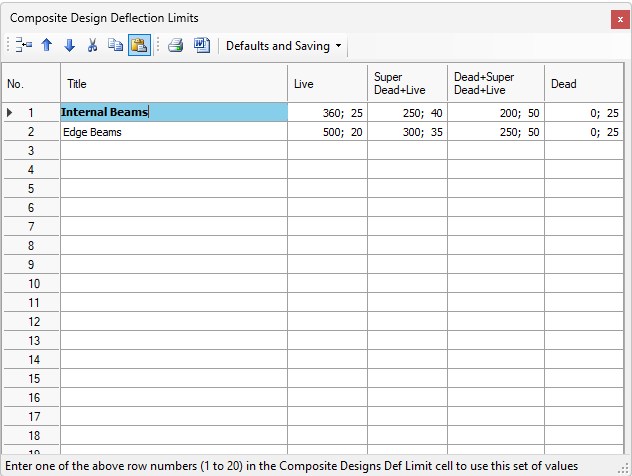
This table can be used to create up to 20 different groups of deflection parameters, which can then be accessed through the Deflection Limit Set dropdown list.
Span /
This input is the denominator used to set a deflection limit based on the span of the beam (e.g. input '360' to set a deflection limit of span/360, '250' to set a deflection limit of span/250 etc.).
Abs. (mm)
This input is used to set an absolute limit (mm) on deflection. It can be defined alongside a 'span-over' ratio by using a semicolon (e.g. '360;10' sets a limit of the lesser of span/360 or 10 mm).

Precamber on Beam (mm)
This specifies an upward curvature which has been fabricated into the beam, measured at mid-span, in order to offset deflections based upon dead load and self weight. Dead load and self weight based deflection limits are measured from the horizontal, so a precambered beam provides significant help to stay within these limits.
Instantaneous deflection checks based upon live load movement and/or super-imposed dead load movement are independent of precamber as they only consider beam movement after all dead loads have been applied.
Vibration Design
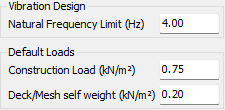
Natural Frequency Limit (Hz)
This sets the lower bound for the structure's natural frequency to ensure floor comfort.
Default Loads
Construction Load (kN/m²)
This is the temporary variable load applied whilst pouring concrete to account for personnel and equipment. The program default is 0.75 kN/m².
Deck/Mesh self weight (kN/m²)
This load accounts for the permanent self-weight of the profiled metal sheeting and the mesh reinforcement. The program default is 0.2 kN/m².