Design of Wall Piers
Concrete Wall Design Manual Entry: 📄 Piers
In the Concrete Wall Design module, "pier strips" (or wall piers) allows you to break down large Finite Element (FE) shear walls into manageable vertical zones for reinforcement design.
Here is a detailed breakdown of how pier strips work, how they are subdivided, and how forces are handled in the design process.
MasterSeries 2023: Introduction to Concrete Shear Wall Design
1. What is a Wall Pier / Pier Strip?
In MasterSeries, a Wall Pier represents a vertical portion of a shear wall that is not interrupted by openings within the height being considered.
- Function: It is intended to transfer vertical forces (from gravity loads) and resist in-plane lateral loads (wind/stability).
- Design Theory: The software treats the pier (or each individual strip within the pier) as a concrete column subjected to axial force (tension or compression) and biaxial bending. It also checks for shear in two directions.
- Design Forces: The 1D column-like design force are derived by summing up from the 2D finite shell element results.
- Axial Force - Total of Fy kN/m vertical membrane force over the pier design strip width
- Major Axis Moment - Moment in the plane of the wall. This value of moment is not directly given by the FE shell element result, but is derived from the Fy forces by summing up the Fy x lever arm from centroid over the design strip width.
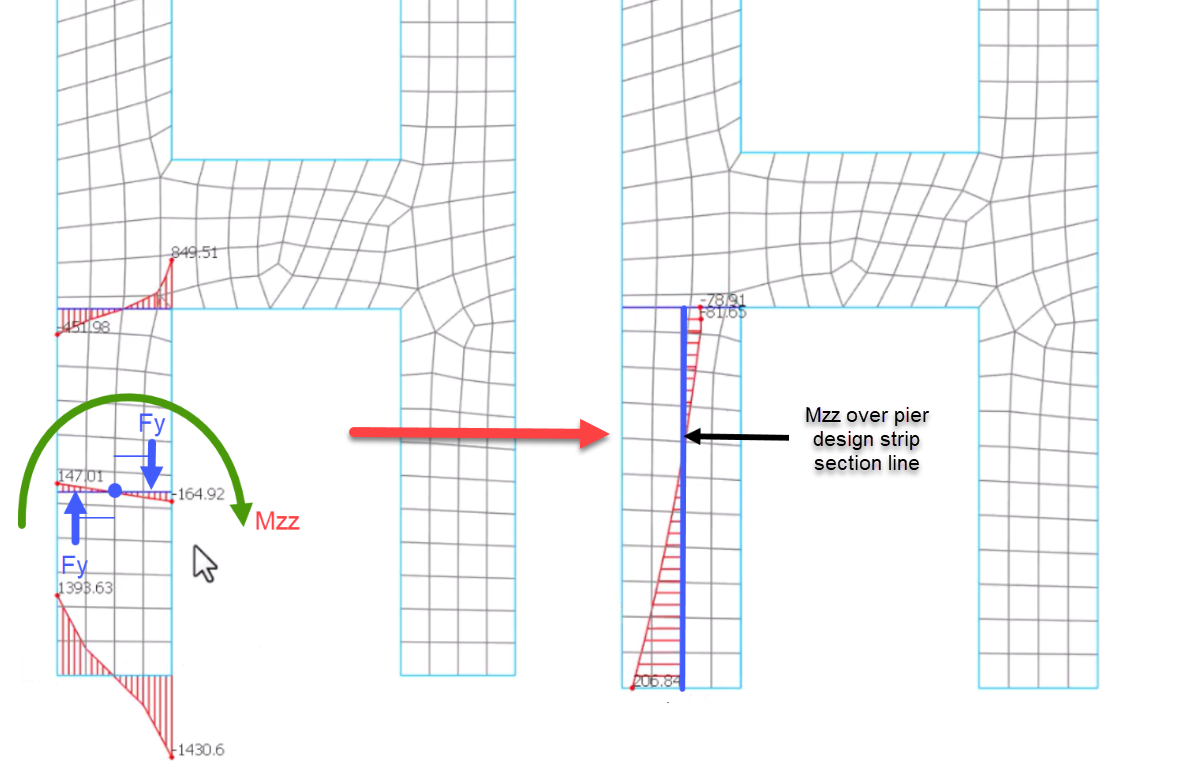
- Minor Axis Moment - Directly provided by the out of plane shell element bending moment, with bending about the horizontal axis of the wall, totalled over design strip width
- Major Axis Shear - Derived from Fxy in-plane membrane shear force totalled over design strip width
- Minor Axis Shear - Derived from Fvy out of plane shear force totalled over design strip width
2. Pier Subdivision Methods
The most critical aspect of understanding pier strips is how the software divides the wall to calculate reinforcement. You do not design the entire wall based on a single peak result; instead, you subdivide it to capture the variation of forces across the wall width.
Each subdivision has it's own design strip and perform a column-like design witheh forces in each subdisiio

There are five primary methods for subdivision:
- Equal Strips – Fixed Width (Default): The software divides the pier into strips of a specific width (e.g., 1m). This is the recommended method for regular pier layouts. The software creates a "make-up" strip in the center if the wall length isn't perfectly divisible by the fixed width.
- Equal Number of Strips: You specify a set number of strips (e.g., 4 strips). The software divides the total wall length by this number to determine the width of each strip.
- User Defined Strip Widths: You manually input specific widths (e.g., "0.5; 0.5; ...") starting from the left. This offers maximum control if you need specific reinforcement zones.
- One Zone: The pier is not subdivided. Design forces are determined over the full width. This is valid for walls with low aspect ratios (height/width < 6) but may mask localized stress peaks,.
- Left and Right Zone: This splits the wall into two outer zones (which resist the moment and axial loads) and one inner zone (designed for shear only). This mimics the behavior of a flanged wall or a core where reinforcement is concentrated at the ends,.
Note on Rounding: For the "Equal" methods, the software can round the strip widths so that the division lines fall exactly midway between your specified vertical bar spacings, ensuring the analysis matches the physical rebar layout.
3. Handling Shear Forces (The Singularity Problem)
In FE analysis, "singularities" or artificial stress spikes often occur at the corners (toes) of shear walls.
Instead of designing each individual strip for the localized peak shear stress found in the FE mesh, the software calculates the total shear force acting on the entire wall pier and divides it proportionally across the strips based on their width. This averages out the unrealistic peaks while ensuring the total shear capacity of the wall is sufficient.
4. Reinforcement Design
Once the strips are defined and forces calculated, the module performs the reinforcement design: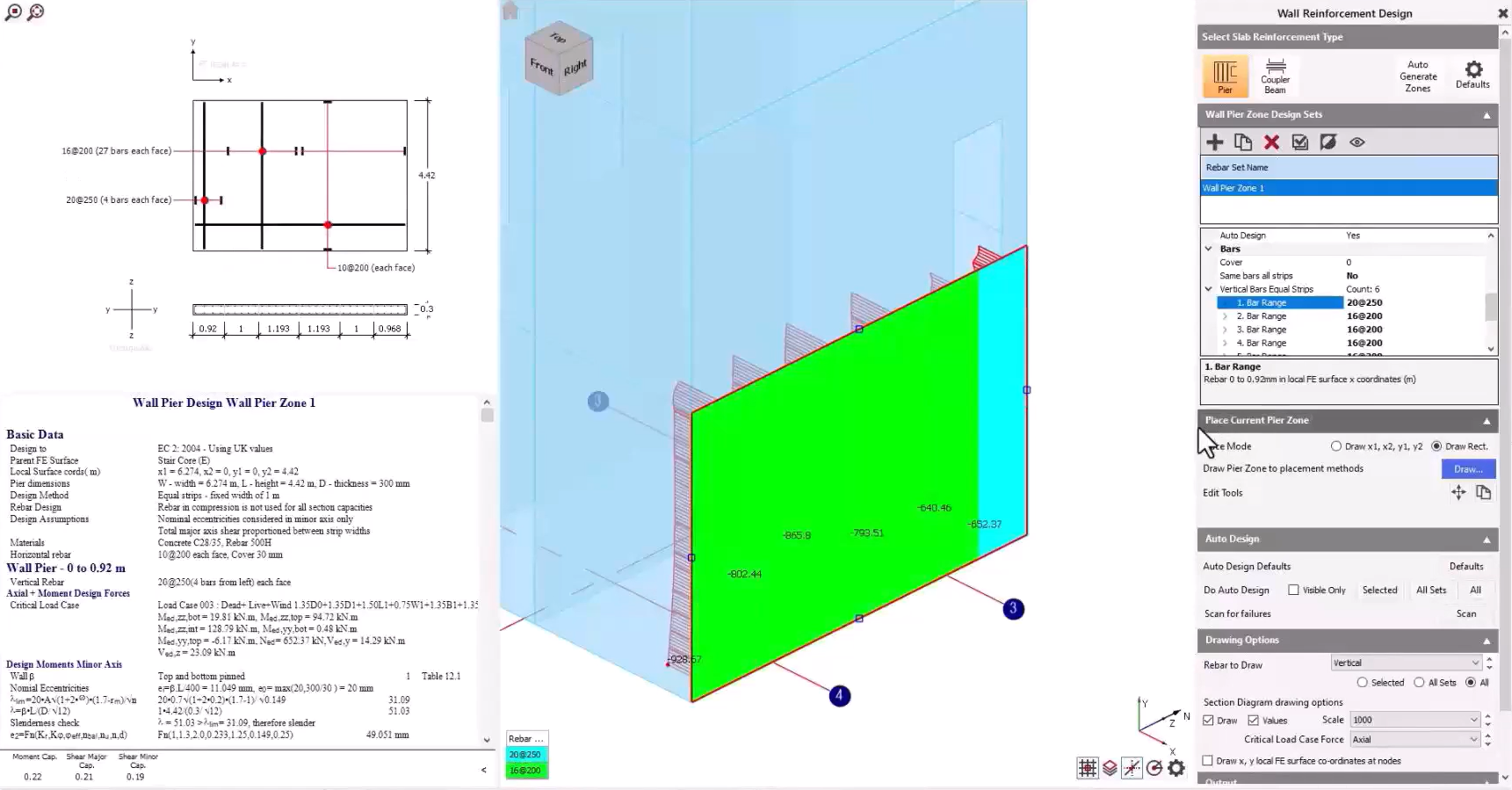
- Bar Consistency: You can choose to enforce "Same bars all strips". This takes the worst-case reinforcement requirement from the critical strip and applies it to the entire wall pier for simplicity. Alternatively, you can design each strip individually to optimize steel usage.
- Compression Reinforcement: You can enable "Use compression rebar", which allows the vertical bars in the compression zone to contribute to the bending capacity. However, this requires strict adherence to detailing rules regarding links and containment, which the user must verify manually.
- Edge Restraints: You must manually define edge restraints (e.g., "Top and Bottom restrained") to calculate the effective height for slenderness and buckling checks, as the software does not automatically infer this from the FE model
5. Workflow Summary
- Model: Create the wall as an FE surface in MasterFrame.
- Define Zone: In the Wall Design module, draw a rectangle over the wall to define the "Pier Zone".
- Subdivide: Select the subdivision method (typically "Equal Strips - 1m") to break the wall into manageable design strips.
- Auto Design: The software analyzes each strip as a column and calculates required vertical and horizontal reinforcement.
- Review: Check unity ratios. If specific strips (usually the ends) are failing, you can locally increase reinforcement or adjust strip widths.
Interpretation of FE Membrane Forces for Column-Like Piers
When designing wall piers as column-like elements, it is important to understand how the in-plane membrane forces from the FE model are interpreted across the defined strip width. The membrane force Fy (local wall axis) is first integrated across the full strip width to obtain the total axial force acting in that pier. This represents the column-like axial load used in the combined axial and bending design checks.
In addition, the same distributed Fy forces are resolved about the pier centroid: the software sums Fy × lever arm contributions across the strip to determine the resulting in-plane bending moment (equivalent to the pier’s major-axis moment). In other words, the pier design forces are not taken from a single peak value, but from the integrated membrane force distribution over the strip width, producing both the axial force and the associated bending moment used in the section design.