
Global Meshing Options
Once the Finite Element surfaces have been set up, the parameters to use in creating the FE mesh need to be determined. The meshing and analysis options are accessed through the📄 FE Surface Meshingmenu. Once the meshing parameters have been determined, the mesh is then automatically created by the software, using a meshing algorithm.
The Global Analysis options can be accessed by going to Analysis>FE Surface Meshing>Global Meshing Options. This will open a small pop up window, entitled Finite Element Mesh Generation Options. The layout of this window is shown below.
You can choose to mesh all column regions, slab regions or both.
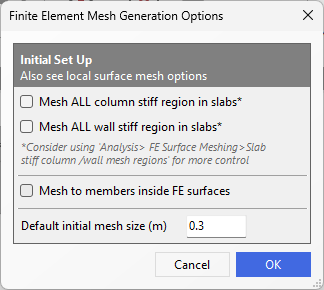
The Global Meshing options control the global mesh settings. The options are:
Mesh to all column stiff region in slabs
This option amends the mesh layout and size in slabs to account for the cross section of all columns at the point of intersection with the slab.
Mesh to all wall stiff region in slabs
This option amends the mesh layout and size in slabs to account for the cross section of walls at the point of intersection with the slab.
Mesh to members inside FE surface
This option causes the mesh generation to incorporate the geometry of members internal to the FE boundary.
Default initial mesh size input
The default initial size setting controls the size of the finite elements within the mesh. This is the default size of the mesh when the mesh size is not controlled by other factors, such as node spacing or the settings of the local mesh intensities.