Management of 'Non-Standard' User Steel Sections
Non-standard steel sections differ significantly from the standard sections typically managed in MasterSeries, primarily because they do not adhere to the geometric properties defined within design codes, such as Eurocodes or British Standards.
Consequently, profiles designated as 'non-standard' cannot be designed to coded standards within the MasterKey: Steel Design module.
Management and Application
The primary function of non-standard sections in MasterSeries is for analysis only, utilizing the section's inherent stiffness properties.
- Purpose: Non-standard sections are used to model structural elements with irregular cross-sections. They can be specified and analysed within MasterFrame, allowing key stresses to be extracted from the analytical model for external verification based on design member moment capacities.
- Location: The addition and editing of non-standard section profiles are managed within MasterFrame under the Member Section Materials properties.
The User Sections Editor, which can be accessed from MasterFrame -> Properties -> Member Sections Materials, provides a general cross-section creation option. 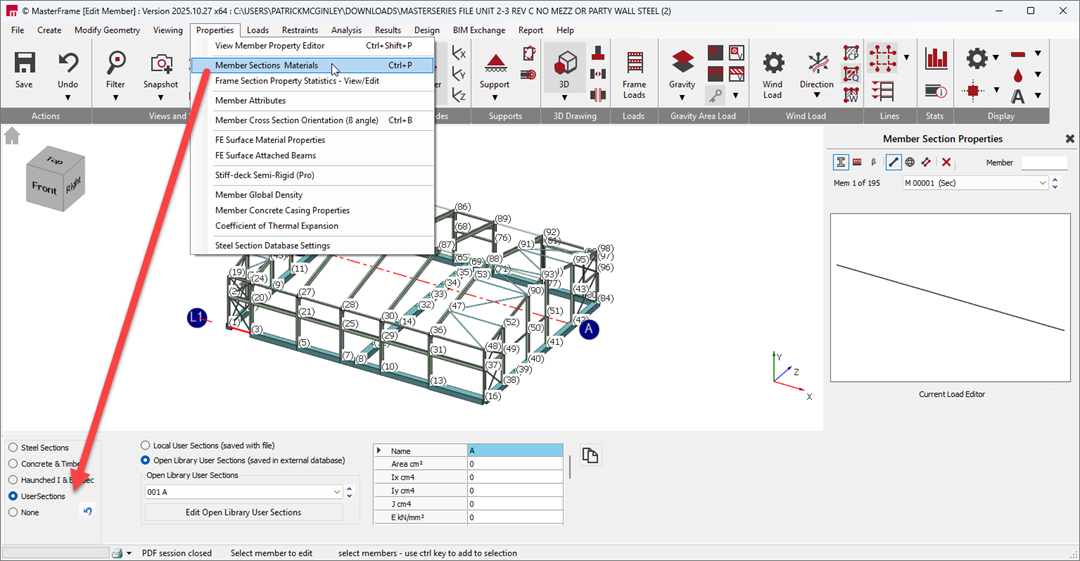
Required Data: Non-standard sections are defined purely based on their basic section properties. Since they lack information about cross-section shape or geometry, they are not suitable for code design. The crucial properties needed for analysis include:
- Area
- Inertia (Ix, Iy)
- Torsion constant (J)
- Modulus of Elasticity (E)
- Shear Modulus (G)
Creation Methods for Non-Standard Sections
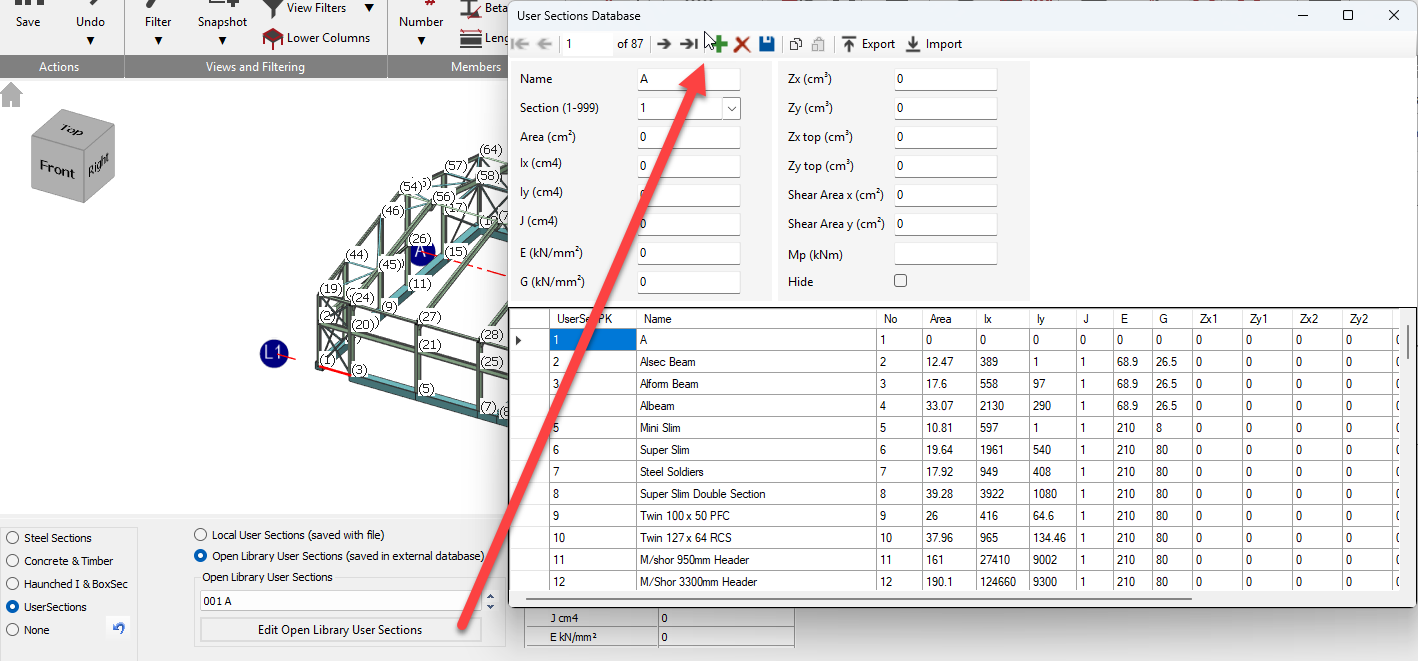
When defining user sections (which includes non-standard sections), you must choose whether to save them locally with the file or globally to the Open Library.
- Local User Sections: These sections are saved solely to the file you are working on.
- Open Library User Sections: If you wish the user section to be available for all files on your local computer, you save them to the external database (UserSec.DB from 2022 onwards, replacing the previous .SDF file type) located in the C:\ProgramData\MasterSeries directory. You can access this library by clicking the Edit Open Library User Sections button.
Data Input
You can input the data manually or import data in bulk:
- Manual Entry: All the required cross-section properties (Area, Ix, Iy, J, E, G) are freely entered manually in the text boxes. You must also provide a Name which acts as a descriptor. You can optionally include section modulus values (Zx, Zy, etc.) used for calculating member stresses, shear areas, and plastic moment capacity (Mp).
- Bulk Import: You can import cross-section properties from an external file, typically a comma-delimited .txt file or a .csv spreadsheet. This requires using the Import function within the User Sections database table, typically after creating a table in a spreadsheet application (like Excel) with headers matching the relevant properties.