Management of 'Standard' User Steel Sections
'Standard' user steel sections are those that adhere to code-specific geometric properties (like in-built sections defined by British Standards and Eurocodes), allowing them to be both analyzed and designed within the software, specifically using the MasterKey: Steel Design module.
Procedure for Creating New Standard Steel Sections
Standard user sections are managed within the User Steel Section Database, which is located in the Open Library. You can access the Open Library via the Utilities tab on the MasterSeries start-up screen.
1. Accessing the Database
- Navigate to Utilities and select Open Library.
- Within the MasterSeries Customisation menu, select the Steel Sections tab.

- Since the default sections cannot be modified, you must create a new database set (or change to an editable database). Database files use the .DB file type, replacing the previous .SDF file type.
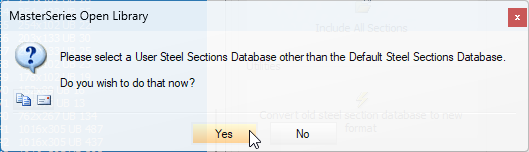

2. Adding Sections
There are two primary methods for adding new sections to your User Steel Sections Database: manual definition or bulk import.
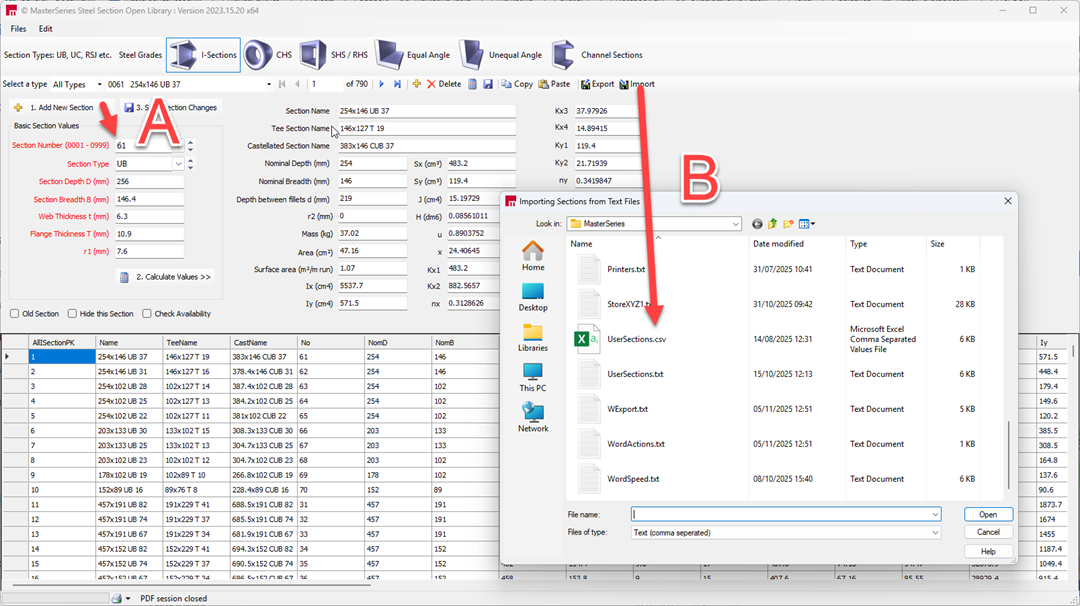
A. Manual Definition (One Section at a Time):
You can input sections manually based on basic dimensions and properties.
Input the required basic section properties. These minimum requirements, common to both local and Library user sections, include:
- Name (as a descriptor)
- Area (Area cm²)
- Inertia (Ix cm4, Iy cm4)
- Torsion constant (J cm4)
- Modulus of Elasticity (E kN/mm²)
- Shear Modulus (G kN/mm²)
- A unique section reference number (typically between 1 and 999 for the open library).
- Optionally, you can also manually input the section modulus values (e.g., Zx and Zy) for member stress calculations, shear areas, and the plastic moment capacity (Mp).
- MasterSeries can calculate the remaining section properties based on these basic geometric dimensions.
- Click the 'Save Data' icon to save the new section to the Open Library database.
B. Importing from an External File (Bulk Import):
You can import an entire library of sections from an external file, typically a .csv spreadsheet or a comma-delimited .txt file.
- Create your table in a spreadsheet application (such as Excel) with headers matching the relevant properties you wish to define.
- Convert this table into a .txt file format (comma-delimited). Technical guidance is available outlining the exact requirements for creating and importing these tables.
- Use the Import function within the User Sections database table to bring the data into MasterSeries.
Understanding Steel Section Property Symbols
Customers may occasionally ask what specific symbols shown in the steel section properties represent. These symbols are derived from the SCI Steel Section Blue Book, which provides the geometric and design properties for standard steel sections. Some of the properties displayed in the software originate from older editions of the Blue Book and were included to support previous design codes. As a result, not every field is used in current Eurocode design.
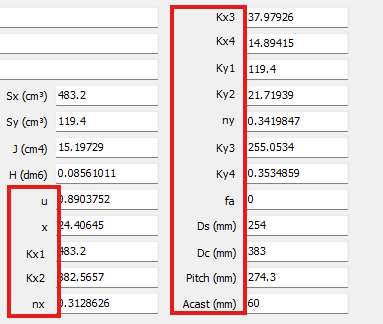
Below is an explanation of the most commonly queried symbols:
| Symbol(s) | Description |
|---|---|
| u and x | Lateral torsional buckling values used for design to BS 5950. These are legacy parameters and are not used for Eurocode design. |
| kx1 to ky4 | Factors used to reduce the plastic capacity of a section when it is subject to axial force. These were primarily used in earlier design methodologies. |
| fa to Acast | Historical section property fields retained for compatibility with older section databases. These values are no longer used in current design calculations. |
3. Usage within MasterFrame
Once the sections are added to the Open Library, they are permanently available on the local computer. You can access and utilise these new standard sections within MasterFrame:
- In MasterFrame, access the Steel Sections Database Settings.
- You can select which database file you are currently working with.
- The software also allows you to embed user-defined sections within the model file itself.
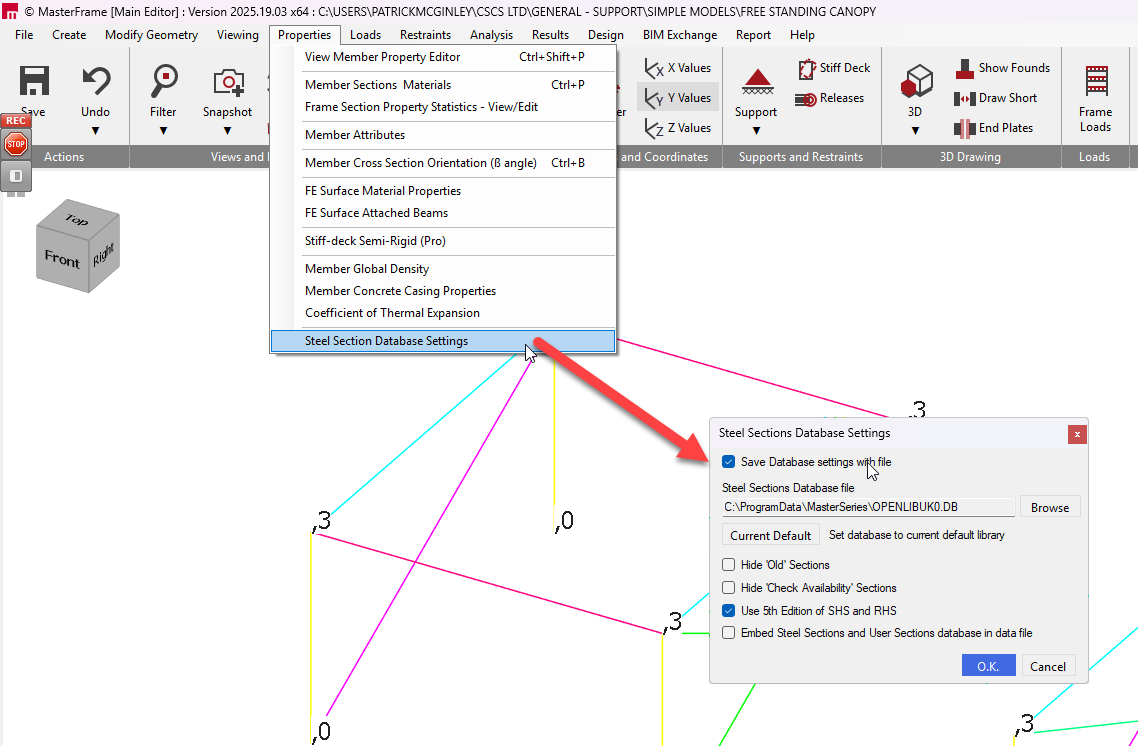
New user sections that are defined as ‘standard’ (i.e., adhering to code geometry rules) can be subjected to both analysis and design checks within the relevant MasterSeries design modules.
Database File Type (Pre 2023 vs. Current):
- The database file type used for standard sections is now .DB.
- This .DB file type replaces the previous .SDF file type as part of a MasterSeries upgrade.

Sharing and Embedding (Pre 2023 vs. Current):
- Open Library user sections are typically saved as a file on a local directory, usually named usersec.db.
- This file can be shared with other users if common sections need to be used across teams.
- A key change relates to embedding: Users can now embed user-defined sections within the model file.
- Previously, users would have to access and send the database file alongside their model.
Editing and Importing:
- Within the Open Library, you can edit an existing library or input basic section values manually. When basic properties are provided (e.g., for I-sections), MasterSeries can calculate the remaining section property values.
- You can import an entire library from an external file, such as a .csv spreadsheet or a comma-delimited .txt file. Importing requires the spreadsheet table to have basic section values and be converted into a .txt file in a specific format.